自己的机械臂导入isaacsim与创建ROS2节点 流程与要点(个人记录)
0 准备
目前isaacsim已经更新到4.5.0,其与4.2.0存在较大更新,但又存在较多bug,为了方便使用,最好同时准备:下载解压4.5.0版本,创建虚拟环境pip安装4.2.0版本。即文件处理使用4.2.0,操作调试使用4.5.0。处理流程参考ROS2官方。
1 xacro文件转urdf文件
isaacsim不支持直接读取xacro文件,因此需要转换为urdf。
转换工具不需要额外下载,ROS2中指令为:xacro xxx.urdf.xacro > xxx.urdf
因为是用到ROS工具,转换前需要注意xacro文件内容中是否有涉及到ros目录,若有需要先到相应位置source install/setup.bash
2 urdf文件转usd文件
isaacsim虽然支持直接读取urdf文件,但非常容易出错(尤其是4.5.0版本),不论是直接读取还是代码转换,都需要基于isaacsim 4.2.0实现。
转换代码如下:
from isaacsim import SimulationApp
simulation_app = SimulationApp({"headless": False})
import logging
import os
import omni.kit.commands
import omni.usd
from omni.importer.urdf import _urdf
from pxr import UsdPhysics, PhysxSchema

logger = logging.getLogger(__name__)

def create_from_urdf(urdf_path, usd_path):
    import_config = _urdf.ImportConfig()
    import_config.make_default_prim = True
    result, prim_path = omni.kit.commands.execute(
        "URDFParseAndImportFile", urdf_path=urdf_path,
        import_config=import_config, dest_path=usd_path,
    )
    omni.usd.get_context().open_stage(usd_path)
    stage = omni.usd.get_context().get_stage()
    prim = stage.GetPrimAtPath("/XXX")
    articulation = UsdPhysics.ArticulationRootAPI.Apply(prim)
    physx_articulation = PhysxSchema.PhysxArticulationAPI.Apply(articulation.GetPrim())
    physx_articulation.CreateEnabledSelfCollisionsAttr().Set(False)
    prim = stage.GetPrimAtPath("/XXX/root_joint")
    prim.RemoveAPI(UsdPhysics.ArticulationRootAPI)
    omni.usd.get_context().save_stage()

if __name__ == '__main__':
    urdf_path = 'XXX.urdf'
    usd_path = 'XXX.usd'
    create_from_urdf(urdf_path, usd_path)
    print("Done")
    logger.info("Done")
    simulation_app.close()
转换后需要在isaacsim中验证模型关节是否正常。
步骤为(4.5.0):
打开isaacsim,file > open ,打开对应usd文件
开启tools > physics > physics inspector,选中整体模型,点击刷新,能够出现关节信息即可


可以拖动关节条,观察关节是否运动
3 usd文件添加ROS2节点
理论上可以添加ROS1或ROS2节点,但目前isaacsim版本默认只支持ROS2,因此不考虑ROS1
添加方式用两种,一种为打开windows > graph editor > generic graph,可视化插入节点,较为麻烦,不展开

另一种则是使用代码插入,代码如下(版本依旧建议4.2.0,4.5.0版本节点信息不一致,且容易出现Bug,依旧不建议)
from isaacsim import SimulationApp
simulation_app = SimulationApp({"headless": False})
import logging
import omni.graph.core as og
import omni.kit.app
import omni.usd
logger = logging.getLogger(__name__)

def create_with_omnigraph():
    prim_path = "/World/XXX"
    joint_states_topic = "/XXX/joint_states"
    joint_command_topic = "/XXX/joint_commands"
    stage = omni.usd.get_context().get_stage()
    stage.DefinePrim(prim_path)
    prim = stage.GetPrimAtPath(prim_path)
    prim.GetReferences().AddReference("XXX.usd")
    og.Controller.edit(
        {"graph_path": "/ActionGraph", "evaluator_name": "execution"},
        {
        og.Controller.Keys.CREATE_NODES: [
            ("OnPlaybackTick", "omni.graph.action.OnPlaybackTick"),
            ("PublishJointState", "omni.isaac.ros2_bridge.ROS2PublishJointState"),
            ("SubscribeJointState", "omni.isaac.ros2_bridge.ROS2SubscribeJointState"),
            ("ArticulationController", "omni.isaac.core_nodes.IsaacArticulationController"),
            ("ReadSimTime", "omni.isaac.core_nodes.IsaacReadSimulationTime"),
            ("PublishClock", "omni.isaac.ros2_bridge.ROS2PublishClock"),
            ("Context", "omni.isaac.ros2_bridge.ROS2Context"),
            ("ConstantTokenTarget", "omni.graph.nodes.ConstantToken"),
            ("ToTarget", "omni.graph.nodes.ToTarget"),
            ("ConstantStringJointStatesTopic", "omni.graph.nodes.ConstantString"),
            ("ConstantStringJointCommandTopic", "omni.graph.nodes.ConstantString"),
            ],
        og.Controller.Keys.CONNECT: [
            ("OnPlaybackTick.outputs:tick", "PublishJointState.inputs:execIn"),
            ("OnPlaybackTick.outputs:tick", "SubscribeJointState.inputs:execIn"),
            ("OnPlaybackTick.outputs:tick", "PublishClock.inputs:execIn"),
            ("OnPlaybackTick.outputs:tick", "ArticulationController.inputs:execIn"),
            ("ReadSimTime.outputs:simulationTime", "PublishJointState.inputs:timeStamp"),
            ("ReadSimTime.outputs:simulationTime", "PublishClock.inputs:timeStamp"),
            ("Context.outputs:context", "PublishJointState.inputs:context"),
            ("Context.outputs:context", "SubscribeJointState.inputs:context"),
            ("Context.outputs:context", "PublishClock.inputs:context"),
            ("ConstantTokenTarget.inputs:value", "ToTarget.inputs:value"),
            ("ToTarget.outputs:converted", "PublishJointState.inputs:targetPrim"),
            ("ToTarget.outputs:converted", "ArticulationController.inputs:targetPrim"),
            ("ConstantStringJointStatesTopic.inputs:value", "PublishJointState.inputs:topicName"),
            ("ConstantStringJointCommandTopic.inputs:value", "SubscribeJointState.inputs:topicName"),
            ("SubscribeJointState.outputs:jointNames", "ArticulationController.inputs:jointNames"),
            ("SubscribeJointState.outputs:positionCommand", "ArticulationController.inputs:positionCommand"),
            ("SubscribeJointState.outputs:velocityCommand", "ArticulationController.inputs:velocityCommand"),
            ("SubscribeJointState.outputs:effortCommand", "ArticulationController.inputs:effortCommand"),
            ],
        og.Controller.Keys.SET_VALUES: [
            ("ConstantTokenTarget.inputs:value", prim_path),
            ("ConstantStringJointStatesTopic.inputs:value", joint_states_topic),
            ("ConstantStringJointCommandTopic.inputs:value", joint_command_topic),
            ],
        },
    )

if __name__ == '__main__':
    manager = omni.kit.app.get_app().get_extension_manager()
    manager.set_extension_enabled_immediate("omni.isaac.ros2_bridge", True)
    print("ros2_bridge enabled: " + str(manager.is_extension_enabled("omni.isaac.ros2_bridge")))
    logger.info("ros2_bridge enabled: " + str(manager.is_extension_enabled("omni.isaac.ros2_bridge")))
    create_with_omnigraph()
    og_usd_path = 'usd/XXX_ros.usd'
    omni.usd.get_context().save_as_stage(og_usd_path)
    print("Done")
    logger.info("Done")
    simulation_app.close()
转换后需打开生成usd文件查看节点是否存在且正常,若使用4.5.0版本打开4.2.0生成文件会显示警告,原因就是4.5.0因为不再使用omniverse,节点名称发生改变,实际上isaacsim会自动替换正确节点,无需在意:

接下来打开generic graph,选择editor,再选择创建的对象,里面包含节点输出模块

4 ROS2节点测试
点击左侧菜单栏play,运行仿真环境
打开终端,输入
ros2 topic echo /XXX/joint_states输出关节信息
可以打开physics inspector,改变关节角度,可以看到终端输出同时改变
5 添加相机及其ROS节点
有时候机械臂运动需要视觉信息,但机械臂模型本身是没有相机的,需要手动添加。
选择需要添加相机的模块,选择create > camera
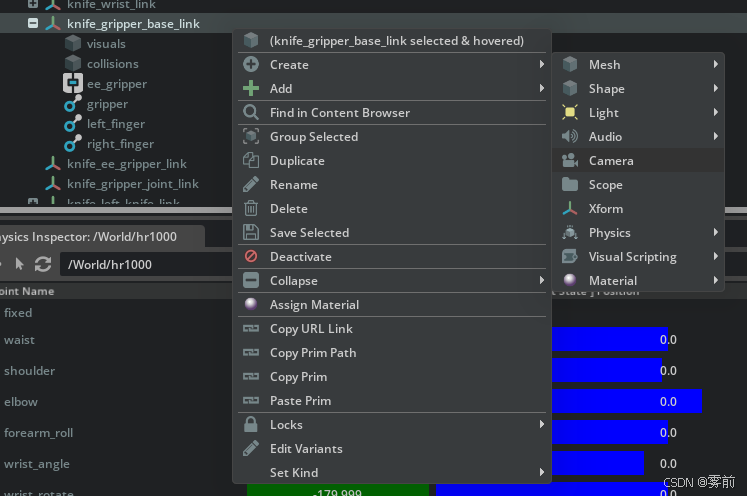
然后依据需求调整相机位置角度
ROS配置可参考大佬的教程,不过里面是ROS1,实际使用需要改为ROS2,其实就是各个模块里名称部分从“ROS1”变成了“ROS2”而已
 http://zhaoxuhui.top/blog/2022/12/16/omniverse-and-isaac-sim-note5-isaac-sim-ros-api-for-image-and-pose-topic-publish.html#21-action-graph%E6%9E%84%E5%BB%BA

聚焦RDK与具身智能,汇集机器人开发教程、开源案例和技术交流
更多推荐
 39
 0
- 0


 已为社区贡献2条内容

所有评论(0)